Showing posts with label troubleshooting. Show all posts

Monday, July 30, 2012

Sync up Sitecore Search Index Update and HTML cache clear


So you have a presentation control (let’s say a sublayout) that relies on Sitecore.Search APIs to get the data to render (news articles for example). Second ingredient in this recipe is HTML cache that you have enabled for this control. The third ingredient is a dedicated Content Delivery server.

You’ve got yourself a race condition between IndexingProvider and HTML Cache!

Monday, May 02, 2011

How to verify HTML cache is working


Greetings,

Here is a quick guide about how to verify that your presentation components (XSLTs, WebControls or Sublayouts) are getting cached.

For more details on how the HTML caching works, see section “3.4.2 Managed Web Site Caches” within Cache Configuration Reference and Chapter 4 within “Presentation Component Reference”.

1. Enable caching settings for your presentation control

Depending on your needs and implementation specifics, you can apply caching on different levels:

- via Layout Details dialog:
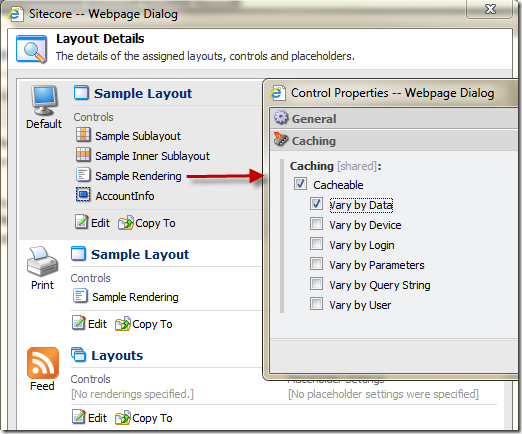
image
- on the definition item of the presentation control:
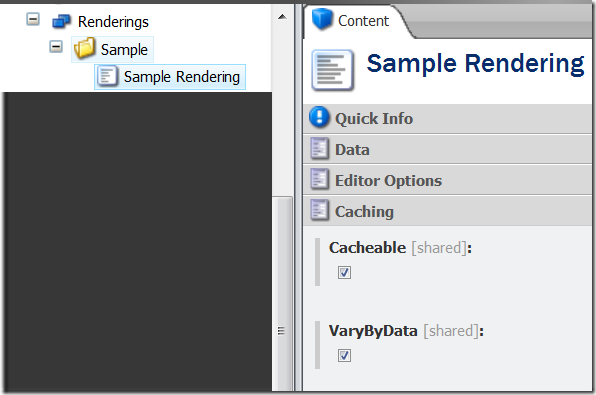
SNAGHTML1cd434f
- within the markup on the control itself if it is bound statically:

   1: <form id="mainform" method="post" runat="server">
   2:     <div id="MainPanel">
   3:       <sc:XslFile ID="sampleXsl"
   4:                   Path="/xsl/sample rendering.xslt"
   5:                   Cacheable="true"
   6:                   VaryByData="true"
   7:                   runat="server" />
   8:       <sc:placeholder key="content" runat="server" /> 
   9:     </div>
  10: </form>

More details about it can be found within Chapter 4 of the “Presentation Component Reference” document. Here is one important snippet from this doc:

When you dynamically bind a rendering to a placeholder using layout details, cache settings explicitly defined in layout details override cache settings defined in the rendering definition item.
Cache settings defined in the definition item apply only when no caching settings exist in the Caching section in the Control Properties dialog.

This post does not explain the difference between cache variation settings like VaryByData or VaryByDevice. Consult the official documentation mentioned above in order to find appropriate strategy for your site.

2. Verify that the change to the cache setting got published to the “web” database.

For that, you can use the database selector at the bottom right corner and then open Content Editor to browse the content of the published database.
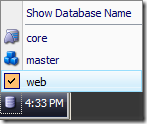
SNAGHTML1d452ab

In a distributed server scenario, such things as cache clearing may be factoring in. So make sure that the data cache is properly cleared after publishing.

3. Use Sitecore Debugger to explore Trace

After you confirm that the cache setting were published, verify that Sitecore is caching it using Sitecore Debugger. The article is for Sitecore 5.3 but most concepts are still valid for your version.

3.1 To start the debugger, click on the “Debug” item in the menu:
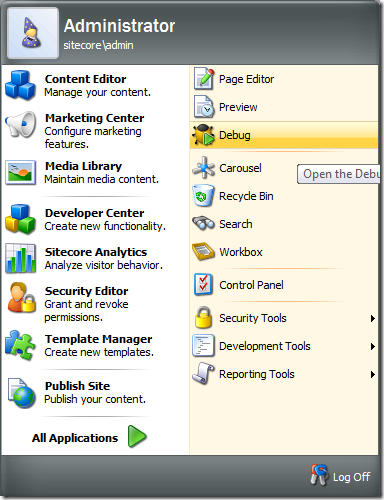
image

3.2 When the debugger is launched, make sure to disable “Rendering Information” feature, otherwise caching won’t work within the debugger:

image

3.3. Locate the page where the presentation component is placed.

3.4. Refresh the page a couple of times.

3.5. Scroll down to the “Trace” section and locate your rendering:

image

If the control is cached, you should see the highlighted (using cache) string.

4. Rendering Statistics page

Another way to confirm is to launch the “Rendering Statistics” page: /sitecore/admin/stats.aspx where you can see the number of times your rendering is fetched from cache vs. total render count:

image

As you may have guessed, the value within the “From cache” column should not be zero.

5. Verify that HTML caching is turned on.

If the steps above indicate that presentation component is not getting cached, consult you’re the cache page: /sitecore/admin/cache.aspx

5.1 Find the current site that you’re running. By default, it should be “website”.
5.2 Find the column for html cache of your website.
5.3 Verify that the MaxSize column is not set to zero.

SNAGHTML1dfb62e

6. Verify the configuration

If the cache page shows zero, then it’s time to review your configuration.

Within web.config, make sure that:

6.1 Default HTML cache size is not set to zero:

   1: <setting name="Caching.DefaultHtmlCacheSize" value="5MB"/>

6.2 Locate your website definition within the <sites /> section and make sure that cacheHtml is set to “true” and the value of “htmlCacheSize” is not set to zero:

   1: <site name="website" ... cacheHtml="true" htmlCacheSize="10MB" />

6.3 Locate the <cacheSizes /> section next to the <sites /> section. Make sure that the html cache is not set to zero here too:

   1: <cacheSizes>
   2:    <sites>
   3:       <website>
   4:          <html>10MB</html>
   5:          ...
   6:       </website>
   7:    </sites>
   8: </cacheSizes>

This should be more or less sufficient in order to troubleshoot html cache issues.

HTH.

Thursday, December 09, 2010

Assembly Version Conflicts for Newtonsoft.Json, Telerik, ComponentArt, etc.


Hi there,

Most of you know that Sitecore CMS relies on a few 3rd party components that help providing compelling web experience. A few come to mind: Telerik’s RTE, ComponentArt’s grids, JSON for .NET utility from Newtonsoft, Lucene.NET, etc.

Since earlier Sitecore versions (pre 6.3) rely on older versions of these 3rd party assemblies and most implementers are logically striving for using latest and greatest, conflicts of assembly versions arise. And strangely enough, I am hearing about these issues quite frequently now.

So how can these conflicts can be resolved?

Well, since an option of registering those in GAC is almost always a big NO-NO, the following technique proved to be workable for a few customers. It is called assembly version redirection.

What you need to do is add the following into the web.config’s <assemblyBinding>. The following example covers the “Newtonsoft.Json” assembly, however this is applicable to any other 3rd party assembly:

<dependentAssembly>
   <assemblyIdentity name="Newtonsoft.Json" publicKeyToken="30ad4fe6b2a6aeed" />
   <codeBase version="3.5.0.0" href="C:\wwwroot\Sitecore\WebSite\new_bin\Newtonsoft.Json.dll"/>
</dependentAssembly>

Afterwards, feel free to reference the newer version in your Visual Studio project, just remember to set the “Copy Local” property to False.

Note that since the release of Sitecore 6.3, most of those 3rd party assemblies were updated, so this article may be completely useless to you. Just make sure to check the exact Sitecore version you are using on the login page!

As always, thanks goes to our tech support for finding such a plausible alternative.

Wednesday, November 17, 2010

Previewing Sitecore Reports with Windows Report Designer


You probably know that you can edit Sitecore OMS reports outside of the browser with Windows based tools from Stimulsoft available for download here.

Our Report Designer Cookbook on SDN documents the following benefits of the Windows based Designer:

  • Create new reports from scratch
  • Use wizards to quickly create new reports
  • Reports load quickly (the client does not run in a browser window)
  • Use a number of keyboard shortcuts (including Ctrl Z)
  • Preview functionality
  • Create complex SQL queries using the Query Builder
  • Import and export formatting styles

It turns out that the “Preview” functionality does not, you may be seeing the following errors when trying to preview:

image

What you need is to copy the following DLLs from your Sitecore bin folder into the bin directory where Report Designer is installed on your workstation (C:\Program Files (x86)\Stimulsoft Reports.Net 2010.2 Trial\Bin):

  • Sitecore.Oracle.dll
  • Sitecore.Analytics.dll

After you do that, you will be able to preview the reports just fine:

image

Happy reporting!

Friday, November 05, 2010

Resetting Sitecore Staging Module


Greetings,
A quick troubleshooting post on Friday to wrap up the work week Winking smile

This time about our favorite Staging module. This applies to all pre Sitecore 6.3 installations as the latest version does not require this module.

So I have recently witnessed a problem that our customer was facing. The module being stuck during file upload process, giving out a pretty generic error from the Staging log files:

11/2/2010 1:20:29 PM (ER): Could not Execute file upload: Index (zero based) must be greater than or equal to zero and less than the size of the argument list.

It turns out that sometimes the module may not output the most meaningful information to the logs, so the error may not be really helpful here.
For example, this could be caused by missing ACL permissions on the files that the module is synchronizing, etc. By the way, a useful thing to double check – make sure the application pool account has read/write/modify on the folder which are configured to be synchronized.

Here are some quick things you can do fairly to “reset” the module configuration:

1. Delete any files under upload, download and cache sub-folders within the working directory (/sitecore modules/staging/workdir). These are the temp files automatically generated, so it is safe to do this.
2. Clear the value of the “Last updated” field on the appropriate StagingServer item in your master db:

image3. Run any type of publishing to trigger the Staging operation again.
4. Monitor Staging logs which are located within the working directory.

Also, check out this useful troubleshooting resource on Staging module troubleshooting.

Wednesday, September 01, 2010

Exception in alarm clock event subscriber [Common Errors]


Greetings! As you are going into production, hopefully you allocate a few days for exception sweep up. This is applicable to any website running on Sitecore CMS or any platform, really.

One of the common exceptions that I see in customer’s log files these days is related to “alarm clock” event subscriber and can be encountered quite frequently.

Here is the error stack trace that you may be seeing in your logs:

ERROR Exception in alarm clock event subscriber.
Exception: System.Reflection.TargetInvocationException
Message: Exception has been thrown by the target of an invocation.
Source: mscorlib
   at System.RuntimeMethodHandle._InvokeMethodFast(Object target, Object[] arguments, SignatureStruct& sig, MethodAttributes methodAttributes, RuntimeTypeHandle typeOwner)
   at System.Reflection.RuntimeMethodInfo.Invoke(Object obj, BindingFlags invokeAttr, Binder binder, Object[] parameters, CultureInfo culture, Boolean skipVisibilityChecks)
   at System.Reflection.RuntimeMethodInfo.Invoke(Object obj, BindingFlags invokeAttr, Binder binder, Object[] parameters, CultureInfo culture)
   at Sitecore.Reflection.ReflectionUtil.InvokeMethod(MethodInfo method, Object[] parameters, Object obj)
   at Sitecore.Configuration.Factory.AssignProperties(Object obj, Object[] properties)
   at Sitecore.Configuration.Factory.AssignProperties(XmlNode configNode, String[] parameters, Object obj, Boolean assert, Boolean deferred, IFactoryHelper helper)
   at Sitecore.Configuration.Factory.CreateObject(XmlNode configNode, String[] parameters, Boolean assert, IFactoryHelper helper)
   at Sitecore.Pipelines.CorePipelineFactory.GetObjectFromType(String type, XmlNode processorNode)
   at Sitecore.Pipelines.CoreProcessor.GetMethod(Object[] parameters)
   at Sitecore.Pipelines.CorePipeline.Run(PipelineArgs args)
   at Sitecore.Services.AlarmClock.Heartbeat_Beat(Object sender, EventArgs e)

Nested Exception

Exception: System.InvalidOperationException
Message: Category does not exist.
Source: System
   at System.Diagnostics.PerformanceCounterLib.GetCategorySample(String machine, String category)
   at System.Diagnostics.PerformanceCounterCategory.GetCounterInstances(String categoryName, String machineName)
   at Sitecore.Diagnostics.PerformanceCounters.PerformanceCounter.GetInstanceName()
   at Sitecore.Pipelines.HealthMonitor.HealthMonitor.AddCounter(XmlNode configNode)

================================

After a quick research in our knowledge base, I’ve discovered an answer. Apparently, this has been addressed in Sitecore CMS 6.2.0 rev.100104 (Also known as 6.2.0 Update-1).

For 6.0/6.1 instances, you can comment out the following part of your web.config file as a temporary workaround:

<processor type="Sitecore.Pipelines.HealthMonitor.HealthMonitor, Sitecore.Kernel" method="LogCounterStatus">
   <counters hint="raw:AddCounter">
    <!--  <counter category="Process" name="Private Bytes" />
      <counter category="Process" name="Virtual Bytes" />
      <counter category="Process" name="Page File Bytes" />
      <counter category=".net CLR Memory" name="# Bytes in all Heaps" />
      <counter category=".net CLR Memory" name="% Time in GC" />
      <counter category=".net CLR Memory" name="Large Object Heap size" />
      <counter category=".net CLR Loading" name="Bytes in Loader Heap" />
      <counter category=".net CLR Loading" name="Current Assemblies" />-->
   </counters>
</processor>

If you are still on 6.0 or 6.1, start thinking about upgrading. It is especially easy to do it from 6.1! Check the official steps here.

Thursday, July 29, 2010

Sitecore Error in Package Designer/Installation Wizard


I just got the following exception in the Package Designer on my fairly clean Sitecore 6.1 install.

Unable to load one or more of the requested types. Retrieve the LoaderExceptions property for more information.


Exception Details: System.Reflection.ReflectionTypeLoadException: Unable to load one or more of the requested types. Retrieve the LoaderExceptions property for more information.
Source Error:

An unhandled exception was generated during the execution of the current web request. Information regarding the origin and location of the exception can be identified using the exception stack trace below.

Stack Trace:

[ReflectionTypeLoadException: Unable to load one or more of the requested types.
Retrieve the LoaderExceptions property for more information.]
System.Reflection.Module._GetTypesInternal(StackCrawlMark& stackMark) +0
System.Reflection.Assembly.GetTypes() +96
Sitecore.Shell.Applications.Installer.Commands.Commands.Init() +48
Sitecore.Shell.Applications.Installer.Commands.Commands..cctor() +6

[TypeInitializationException: The type initializer for
'Sitecore.Shell.Applications.Installer.Commands.Commands' threw an exception.]
Sitecore.Shell.Applications.Installer.Commands.Commands.Init() +36
Sitecore.Shell.Applications.Installer.Designer..ctor() +10

Based on the findings from our support portal, I found out that quite a few customers had the same issue and that is it also popping up in Installation Wizard.
So I decided to publish a quick post about it.

The stack trace indicates that the Installer app is trying to load some commands via reflection and obviously fails during this process.
By merging the bin directory of my Sitecore installation with the clean distributive, I found out that a few assemblies were somehow different, specifically Sitecore.Kernel.dll and Interop.Shell32.dll. So I copied them over from the clean distributive…and that resolved the issue!
It begs the question how it happened specifically, and my hunch is that somehow the DLLs got overwritten during the build process by Visual Studio, but let’s keep that as mystery.

Happy troubleshooting!

Sunday, December 13, 2009

WFFM 2.0 module: Form Reports Viewer throws exception


If you are like me who enjoys stripping down Sitecore solution as much as possible, you may stumble across this as well.

On Sitecore 6.1/6.2 install with awesome Web Forms for Marketers module 2.0, you may get the following exception if your bin folder is missing SQLite assemblies (Sitecore.SQLite.dll and System.Data.SQLite.DLL). Even if you are not using SQLite, apparently, there is a dependency on these guys from the module’s assemblies. Putting them back obviously solves the problem.

Server Error in '/' Application.


Unable to load one or more of the requested types. Retrieve the LoaderExceptions property for more information.

Description: An unhandled exception occurred during the execution of the current web request. Please review the stack trace for more information about the error and where it originated in the code.
Exception Details: System.Reflection.ReflectionTypeLoadException: Unable to load one or more of the requested types. Retrieve the LoaderExceptions property for more information.
Source Error:

An unhandled exception was generated during the execution of the current web request. Information regarding the origin and location of the exception can be identified using the exception stack trace below.

Stack Trace:

[ReflectionTypeLoadException: Unable to load one or more of the requested types. Retrieve the LoaderExceptions property for more information.]

System.Reflection.Module._GetTypesInternal(StackCrawlMark& stackMark) +0

System.Reflection.Assembly.GetTypes() +111

System.Data.Metadata.Edm.AssemblyCacheEntry.LoadTypesFromAssembly(LoadingContext context) +28

System.Data.Metadata.Edm.AssemblyCacheEntry.InternalLoadAssemblyFromCache(LoadingContext context) +290

System.Data.Metadata.Edm.AssemblyCacheEntry.LoadAssemblyFromCache(Assembly assembly, Boolean loadReferencedAssemblies, Dictionary`2 knownAssemblies, Dictionary`2& typesInLoading, List`1& errors) +137

System.Data.Metadata.Edm.ObjectItemCollection.LoadAssemblyFromCache(ObjectItemCollection objectItemCollection, Assembly assembly, Boolean loadReferencedAssemblies) +284

System.Data.Metadata.Edm.ObjectItemCollection.LoadAssemblyForType(Type type) +33

System.Data.Metadata.Edm.MetadataWorkspace.LoadAssemblyForType(Type type, Assembly callingAssembly) +80

System.Data.Common.Utils.MetadataHelper.TryDetermineCSpaceModelType(MetadataWorkspace workspace, EntityType& modelEntityType) +67

System.Data.Objects.ObjectContext.ExecuteFunction(String functionName, ObjectParameter[] parameters) +238

Sitecore.Forms.Data.SitecoreWebFormsContext.GetFormsByMainParams(Nullable`1 formId, String storageName, Nullable`1 pageIndex, Nullable`1 pageSize, Nullable`1 asc, ObjectParameter returnValue) +593

Sitecore.Forms.Data.DataProviders.WFMDataProvider.GetForms(QueryParams queryParams, Int32& total) +911

Sitecore.Forms.Data.DataProvider.GetPage(PageCriteria page, IList`1 sort, IList`1 filters) +534

Sitecore.Form.DataViewer.SortedFilterable`1.GetPage(PageCriteria page, IList`1 sort, IList`1 filter) +55

Sitecore.Form.Core.DataViewer.FormGridSource`1.GetEntries(Int32 pageIndex, Int32 pageSize) +104

Sitecore.Form.DataViewer.ComponentArtGridHandler`1.GetDataSource(Int32 pageIndex, Int32 pageSize) +56

Sitecore.Form.DataViewer.ComponentArtGridHandler`1.ApplyDataSource() +76

Sitecore.Form.DataViewer.ComponentArtGridHandler`1.Grid_NeedDataSource(Object sender, EventArgs e) +54

ComponentArt.Web.UI.Grid.OnNeedDataSource(EventArgs e) +36

ComponentArt.Web.UI.Grid.DataBind() +475

Sitecore.Form.DataViewer.ComponentArtGridHandler`1.DataBind() +17

Sitecore.Form.DataViewer.ComponentArtGridHandler`1.InitializeGrid(Boolean dataBind) +503

Sitecore.Form.DataViewer.ComponentArtGridHandler`1..ctor(Grid grid, IGridSource`1 source, Boolean dataBind) +173

Sitecore.Form.DataViewer.ComponentArtGridHandler`1.Manage(Grid grid, IGridSource`1 source, Boolean dataBind) +94

Sitecore.Forms.Shell.UI.FormDataViewer.FormDataViewerPage.GridRender(Boolean update) +360

Sitecore.Forms.Shell.UI.FormDataViewer.FormDataViewerPage.OnPageSelected(Object sender, MultiPageSelectEventArgs e) +110

Sitecore.Forms.Shell.UI.FormDataViewer.FormDataViewerPage.OnLoad(EventArgs e) +223

System.Web.UI.Control.LoadRecursive() +50

System.Web.UI.Control.LoadRecursive() +141

System.Web.UI.Page.ProcessRequestMain(Boolean includeStagesBeforeAsyncPoint, Boolean includeStagesAfterAsyncPoint) +627


Version Information: Microsoft .NET Framework Version:2.0.50727.4927; ASP.NET Version:2.0.50727.4927

Friday, December 11, 2009

Friday case: Sitecore is not starting up


Just had to deal with a pretty mysterious issue when my Sitecore app stopped staring up for whatever reasons.
Symptoms:
- nothing happens, browser just hangs with the “Connecting…” message
- nothing in the Sitecore logs
- nothing in the Event Viewer
- nothing unusual on the SQL side
- nothing unusually heavy on the worker process – CPU is idling out, memory is fine.

In overall, a sign that something is inherently wrong.