Showing posts with label publishing. Show all posts

Thursday, July 05, 2012

Sitecore Pre-Production Preview


It’s time to revisit my old blog series from a couple of years ago. I’ve blogged about ways to setup a pre-production preview environment back in 2009 and 2010. I suggest reviewing those before reading this post further, as I am not going to provide a lot of context. Since the last post, I was getting even more questions about how to set this up, so here is another take on the same problem that involves less customization, and in my book, it’s much easier to setup.

The idea is simple and rotates around the notion of running kind of a “Live mode” on separate Pre-Production Preview server.
This server will source out content from the master database instead of “pre-prod web” database. This will let you get away from using publishing, thus reducing complexity.

Friday, November 05, 2010

Resetting Sitecore Staging Module


Greetings,
A quick troubleshooting post on Friday to wrap up the work week Winking smile

This time about our favorite Staging module. This applies to all pre Sitecore 6.3 installations as the latest version does not require this module.

So I have recently witnessed a problem that our customer was facing. The module being stuck during file upload process, giving out a pretty generic error from the Staging log files:

11/2/2010 1:20:29 PM (ER): Could not Execute file upload: Index (zero based) must be greater than or equal to zero and less than the size of the argument list.

It turns out that sometimes the module may not output the most meaningful information to the logs, so the error may not be really helpful here.
For example, this could be caused by missing ACL permissions on the files that the module is synchronizing, etc. By the way, a useful thing to double check – make sure the application pool account has read/write/modify on the folder which are configured to be synchronized.

Here are some quick things you can do fairly to “reset” the module configuration:

1. Delete any files under upload, download and cache sub-folders within the working directory (/sitecore modules/staging/workdir). These are the temp files automatically generated, so it is safe to do this.
2. Clear the value of the “Last updated” field on the appropriate StagingServer item in your master db:

image3. Run any type of publishing to trigger the Staging operation again.
4. Monitor Staging logs which are located within the working directory.

Also, check out this useful troubleshooting resource on Staging module troubleshooting.

Wednesday, July 21, 2010

Hidden feature of Sitecore 6.2


Too many times I’ve seen this question, it is not even funny. My images are not showing up when I publish an item. While it can easily be explained from the technical perspective and addressed, it does not always make sense from user’s point of view.
Today I’ve learnt that Sitecore 6.2 actually introduced a small feature, an additional processor for the publishItem pipeline, intended to process related media items linked from the FileDropArea field, which was also another addition in 6.2.

Tuesday, December 22, 2009

Publish to pre-production web database


In my experience with enterprise level implementations, there is often a need for a separate “stage environment” for final content preview or a pre-production phase of workflow.

It is also often the case that the environmental limitations or restrictions make the content delivery part of the authoring environment suitable for such purpose. For example, your e-commerce infrastructure could not be available from the authoring instance. One of the possible ways to approach such a requirement is to configure a stand-alone staging instance of Sitecore which will be used for content delivery instance and is commonly configured exactly like one of the servers in the web farm. There is one exception though – the database that is used for content delivery is generally different from the one that is used in production content delivery.

With this approach, now the question is how to plug in workflow in a way that content could go via this “stage” environment and then only upon final approval will be able to get to “production”.

Now there is a problem that you cannot get get items published until they are in final workflow state. You could have two workflow states “Staged” and “Published”, both marked as final and with auto publish actions connected.
I don’t like this approach since it goes against the workflow nature – only one state should be marked as final.

Alternatively, you can plug in a “copy item” workflow action to the “Staged” workflow state where you can programmatically copy an item from master database to stage web.

While this approach does seem legitimate, it works around the need of publishing thus any additional processing you may be having in publish(item) pipeline would not work.

I looked into the option of having publishing process ignore workflow when publishing to stage. While this seemed like a dangerous path to go, I have soon discovered that the PublishHelper’s GetVersionToPublish method already accepts this notion of passing a “requireapproval” flag to the underlying publishing mechanism. Since it is always passes “true”, I started looking into ways to make this flag dynamic and figured that setting it on the level of PublishOptions could be a good idea. For example, from the code of my workflow action I would be able to define whether I want to have workflow respected or not.

Here is what you will need to do to make it work.

First, override the default PipelinePublishProvider and plug it into the web.config:

<publishManager defaultProvider="default" enabled="true">
    <providers>
        <clear />
         <!--<add name="default" type="Sitecore.Publishing.PipelinePublishProvider, Sitecore.Kernel" />-->
         <add name="default" type="SCUSAINC.Publishing.ExtendedPublishProvider, SCUSAINC.Publishing" />
     </providers>
</publishManager>

Secondly, you will need to override the CreatePublishHelper class:

public class ExtendedPublishProvider : PipelinePublishProvider
    {
        public override PublishHelper CreatePublishHelper(PublishOptions options)
        {
            Assert.ArgumentNotNull(options, "options");
            if (options is ExtendedPublishOptions)
                return new ExtendedPublishHelper(options as ExtendedPublishOptions);

            return new PublishHelper(options);
        }
    }

After that, introduce two more classes – ExtendedPublishHelper and ExtendedPublishOptions:

public class ExtendedPublishHelper : PublishHelper
    {
        private readonly ExtendedPublishOptions _options;

        public ExtendedPublishHelper(ExtendedPublishOptions options)
            : base(options)
        {
            _options = options;
        }

        public override Item GetVersionToPublish(Item sourceItem)
        {
            Assert.ArgumentNotNull(sourceItem, "sourceItem");
            if (Options is ExtendedPublishOptions)
            {
                return sourceItem.Publishing.GetValidVersion(Options.PublishDate, _options.RequireApproval);
            }

            return sourceItem.Publishing.GetValidVersion(Options.PublishDate, true);
        }
    }

public class ExtendedPublishOptions : PublishOptions
    {
        public ExtendedPublishOptions(Database sourceDatabase, Database targetDatabase, PublishMode mode, Language language, DateTime publishDate, bool requireApproval)
            : base(sourceDatabase, targetDatabase, mode, language, publishDate)
        {
            RequireApproval = requireApproval;
        }

        public bool RequireApproval { get; set; }
    }

Now you are ready to launch publishing with workflow settings completely ignored. For example, this is how you can do it from the workflow action:

var database = Factory.GetDatabase(databaseName);

var options = new ExtendedPublishOptions(dataItem.Database, database, PublishMode.SingleItem, dataItem.Language, DateTime.Now, true)
{
         RootItem = dataItem,
         Deep = true;
};

new Publisher(options).PublishAsync();

That’s it!

Tested on Sitecore 6.1. Expected to work with 6.2.

Monday, December 14, 2009

Get all published items in Sitecore 6.1/6.2


You may need to get all items that were processes by a publishing operation for different reasons, for example, pull certain information for each item and notify CDN of a change so cache could be purged. AKAMAI can be configured to behave that way.
Currently we have two articles on the subject. This one describes how to use the PublishEngine, second article suggests approach with custom PublishLog. Both are not compatible with 6.x. So I’ve looked into the options for the latest Sitecore with tech support. Our findings included introduction of a new PublishProcessor which examines the Queue property of PublishContext, but this did not work properly for smart publishing and I wanted a bulletproof yet simple approach applicable to all possible publishing modes.
Then I remembered that we are already doing similar things for indexing. The update index job processes only changed items and gets that information from the History storage.

Thursday, February 08, 2007

Publish at a specific time


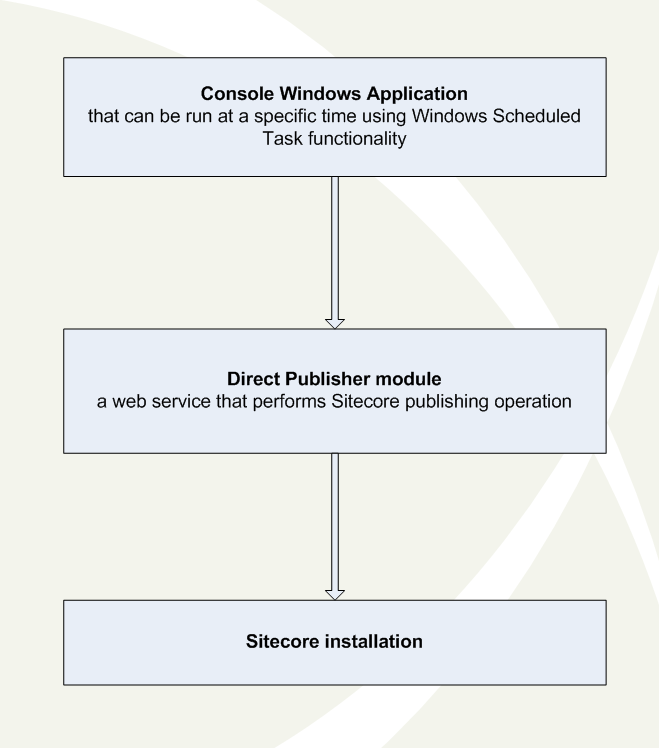
The nature of the Sitecore scheduled operation is cyclic. The task’s execution time relies on the frequency and interval parameters in the web.config file. This approach has significant benefits. Since there is no way to either prevent the ASP.NET process from recycling or predict the recycle time, the cyclic approach makes it easier to guarantee that your scheduled task will be executed in next timeframe despite ASPNET process terminates the task execution. However, sometimes it is necessary to call a task at a specific time. The best example is the publishing task. This module approaches this scenario. The module’s architecture is depicted below: So the module consists of two components: 1. Console Windows application that invokes a web service. 2. Web Service that calls Sitecore publishing operation. Here you can download archive with the documentation and the module itself. Any feedback is really appreciated.

Thursday, November 30, 2006

Workflow with unpublishing


Nothing difficult, but I thought this might be interesting anyway.

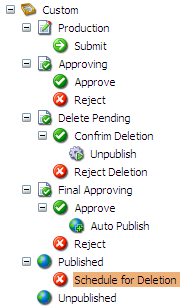
So we need to implement a workflow which provides us with a possibility to schedule item deletion and finally unpublish it from the front end upon confirmation.

The key point is additional workflow state named "Deletion Pending" which is referred by the "Schedule for Deletion" command.It has two commands: "Confirm Deletion" and "Reject Deletion". The first command unpublishes item and the second returns it to the "Published" state.

The "Process" method that is invoked by the "Unpublish" workflow action looks like this:

public void Process(WorkflowPipelineArgs args) { Error.AssertObject(args.DataItem, "args.DataItem"); Item item = args.DataItem;

Database web = Factory.GetDatabase("web"); Database master = Factory.GetDatabase("master");

using (new Sitecore.SecurityModel.SecurityDisabler()) { DeleteItem(web, item); DeleteItem(master, item);

// RemoveLinks(item); LinkManager.UpdateLink(item); }

Sitecore.Context.ClientPage.SendMessage(this, String.Format("item:refresh(id={0})", item.ID)); }

private void DeleteItem(Database db, Item item) { if (db.Items[item.ID] != null) { db.Items[item.ID].Delete(); Log.Info(String.Format("Item {0} was deleted from the {1} database using the workflow command.", item.Paths.FullPath, db), this); } else { Log.Info(String.Format("Deletion for the item {0} failed for the {1} database. Item not found.", item.Paths.FullPath, db), this); } }

I've found two cons so far:

  1. multiple final states: "Published" and "Unpublished"
  2. the solution is not a substitute of the "Delete" which may be misleading.

Good luck.