Thursday, December 01, 2005
Setting access rights for a section
The key point to make a section visible is to make at least one section's field visible.
Here are a few steps how to achieve this.
1. Go to the Template Manager and choose the Standard Template for editing.
2. Within the Template Editor choose any field in a section.
3. Locate the "Field Security" in the Data section, not the Security section and ensure that the Everyone role doesn't have denied read permission and enable any other role (e.g. Editors) to read it.
4. You can do the same for other fields inside the section.
5. Save changes.
If you want to allow a user to edit the fields inside the section – just, using the described above technique, set Write permission for those fields to this user.
Deny access to the "Copy to" and "Delete subitems" menu items
You can tune up appropriate commands under /content/system/commands in the core database to fit your needs.
Please look at the picture below:
 As a result, the following can be observed for the developer user:

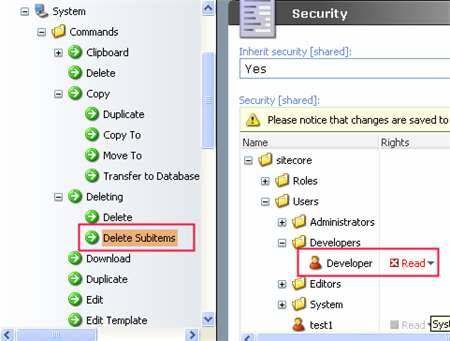 As a result, the following can be observed for the developer user:

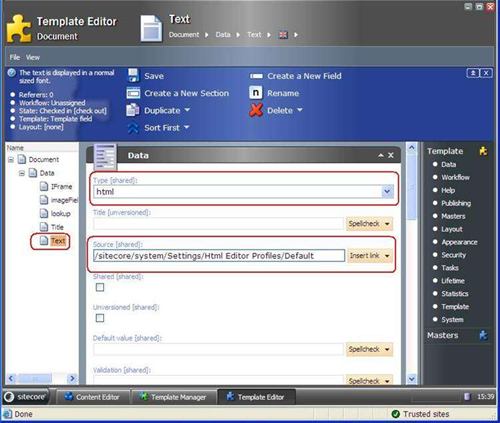
HTML Editor profile tied up to definite field
The matter is that you can assign the whole profile to a certain HTML field.
Go to the Template Editor, select a certain HTML field and fill the Source field with necessary profile.
Please have a look at the image:

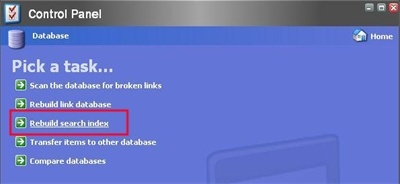
Rebuilding Search Indexes
We've got some cases regarding index problems. The possible errors that can be observed may look like the following ones:
 If it doesn't help, try to manually remove all index files in the following folders:
Could not find file "C:\sitecore\SitecoreInetpub\indexes\master\system\_1jql.fnm".
Description: An unhandled exception occurred during the execution of the current web request. Please review the stack trace for more information about the error and where it originated in the code. Exception Details: System.IO.FileNotFoundException: Could not find file "C:\sitecore\SitecoreInetpub\indexes\master\system\_1jql.fnm".
docs out of order
Description: An unhandled exception occurred during the execution of the current web request. Please review the stack trace for more information about the error and where it originated in the code. Exception Details: System.SystemException: docs out of order
 If it doesn't help, try to manually remove all index files in the following folders:
- indexes/archive/archive
- indexes/core/system
- indexes/master/system
- indexes/recycle bin/recycle bin
- indexes/recyclebin/recyclebin
Retrieving created date from the Messageboard database
In order to read creation date of a definite message stored in the Messageboard database, the created element value from the XML should be used rather than the created_dt value.
It has the following format:
created 7/1/2003 1:18:28 PM
It's much more convenient for the futher date formatting since the created_dt value does not contain any “pm” or “am” definitions.
Then you can apply suggested code snippet in order to change the date format:
string formatedData = dt.ToString("M/d/yyyy H:mm");
Subscribe to:
Comments (Atom)