Monday, December 26, 2005

Is a sublayout in use anywhere?


The following sample code may be useful if you want to know whether a sublayout is used anywhere.

   1: Sitecore.Context.SetActiveSite("shell");
   2: Database masterdb = Sitecore.Context.ContentDatabase;
   3:  
   4: // item for which we check sublayout reference
   5: Item item = masterdb.Items["/sitecore/content/home/test"];
   6:  
   7: // get Renderings field of the item
   8: string rend = item.Fields["__renderings"].Value;
   9: LayoutDefinition layout = LayoutDefinition.Parse(rend);
  10: DeviceItem dev = Sitecore.Context.Device;
  11: DeviceDefinition device = layout.GetDevice(dev.ID.ToString());
  12:  
  13: // the rendering which you want to check referrings to
  14: Item myrendering = masterdb.Items["/sitecore/layout/renderings/document"];
  15:  
  16: // get the rendering of our item
  17: RenderingDefinition rendering = device.GetRendering(myrendering.ID.ToString());
  18:  
  19: if(rendering != null){
  20:   Response.Write(String.Format("Item {0} links to the rendering {1}", item.Name, myrendering.Name));
  21: }
  22: else {
  23:   Response.Write(String.Format("Item {0} doesn't link to the rendering {1}", item.Name, myrendering.Name));
  24: }
Working with Session inside of XSLT


Here are two XSLT statements on how to set and retrieve the session value:
<!-- Setting the session -->
<xsl:value-of select="sc:SetSession('basket','1034=2|3200=1')"/>
<!-- Getting the session variable -->
<xsl:value-of select="sc:Session('basket')"/>
The following output can be observed on the front-end: 1034=2|3200=1

Startmenu in Sitecore v5


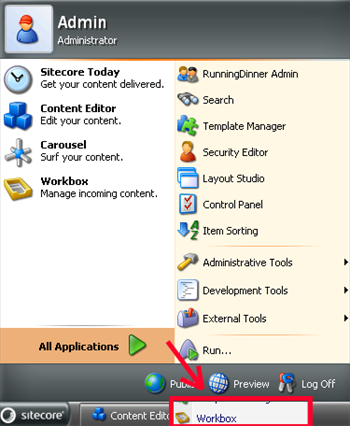
Sometimes when a user clicks the Sitecore button » All Applications, the list of all applictions may be displayed behind the menu. This beahvior is described at the picture below:
This can be cured by completing the following steps:
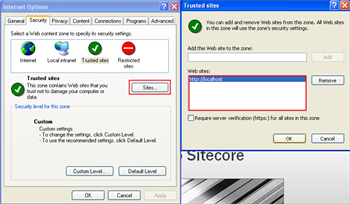
  1. Add the site to the list of the Trusted Sites as it is depicted below:
  2. Please make sure that the client machine has MSXML 4.0 and WinXP SP2 installed.
  3. Delete temporary internet files (IE/Options/Internet Options/Delete Files).

Friday, December 23, 2005

Thumbnails in Sitecore V4


You can use the web.config ImageTypes setting to set an additional image extension for which the thumbnail will be generated: <setting name="ImageTypes" value="|gif|jpg|png|tif|"/>

Thursday, December 22, 2005

Default Content Database


When you try running the code, the default context is set to the website. This means that all database definitions are taken from the website web.config section: ... name="website" virtualFolder="/" physicalFolder="/" rootPath="/sitecore/content" startItem="/home" language="en" database="web" domain="extranet" allowDebug="true" cacheHtml="true" ... As can be seen, the content attribute is missing here, that’s why the content database is undefined. In other words, Sitecore.Context.ContentDatabase returns null. So the following actions can be taken in order to solve the problem: 1. Change the context to the site where the content database is defined. Here is statement to be used before calling Sitecore.Context.ContentDatabase property: Sitecore.Context.SetActiveSite("shell"); or Sitecore.Context.SetActiveSite("modules_shell"); 2. Add the content attribute like it is shown below: ... name="website" virtualFolder="/" physicalFolder="/" rootPath="/sitecore/content" startItem="/home" language="en" database="web" domain="extranet" allowDebug="true" content="master" cacheHtml="true" ...