 The following code...
Database db = Sitecore.Configuration.Factory.GetDatabase("master"); Item item = db.Items["/sitecore/content/home"];
string rend=item.Fields["__renderings"].Value;
LayoutDefinition layout = LayoutDefinition.Parse(rend);
DeviceItem dev = Sitecore.Context.Device;
DeviceDefinition device = layout.GetDevice( dev.ID.ToString());
Item subl1 = db.Items["/sitecore/layout/Sublayouts/Document"]; RenderingDefinition rendering = device.GetRendering(subl1.ID.ToString()); Response.Write("Parameters: " + rendering.Parameters);
...should result the following output:
Parameters: sab=sabvalue
The following code...
Database db = Sitecore.Configuration.Factory.GetDatabase("master"); Item item = db.Items["/sitecore/content/home"];
string rend=item.Fields["__renderings"].Value;
LayoutDefinition layout = LayoutDefinition.Parse(rend);
DeviceItem dev = Sitecore.Context.Device;
DeviceDefinition device = layout.GetDevice( dev.ID.ToString());
Item subl1 = db.Items["/sitecore/layout/Sublayouts/Document"]; RenderingDefinition rendering = device.GetRendering(subl1.ID.ToString()); Response.Write("Parameters: " + rendering.Parameters);
...should result the following output:
Parameters: sab=sabvalue
Thursday, December 08, 2005
Reading sublayout's properties
Create a sublayout named “Document”, pass one parameter to it and performed publishing:
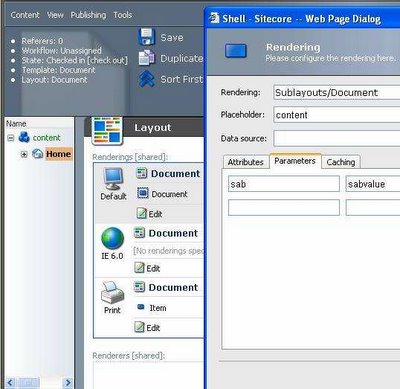 The following code...
Database db = Sitecore.Configuration.Factory.GetDatabase("master"); Item item = db.Items["/sitecore/content/home"];
string rend=item.Fields["__renderings"].Value;
LayoutDefinition layout = LayoutDefinition.Parse(rend);
DeviceItem dev = Sitecore.Context.Device;
DeviceDefinition device = layout.GetDevice( dev.ID.ToString());
Item subl1 = db.Items["/sitecore/layout/Sublayouts/Document"]; RenderingDefinition rendering = device.GetRendering(subl1.ID.ToString()); Response.Write("Parameters: " + rendering.Parameters);
...should result the following output:
Parameters: sab=sabvalue
The following code...
Database db = Sitecore.Configuration.Factory.GetDatabase("master"); Item item = db.Items["/sitecore/content/home"];
string rend=item.Fields["__renderings"].Value;
LayoutDefinition layout = LayoutDefinition.Parse(rend);
DeviceItem dev = Sitecore.Context.Device;
DeviceDefinition device = layout.GetDevice( dev.ID.ToString());
Item subl1 = db.Items["/sitecore/layout/Sublayouts/Document"]; RenderingDefinition rendering = device.GetRendering(subl1.ID.ToString()); Response.Write("Parameters: " + rendering.Parameters);
...should result the following output:
Parameters: sab=sabvalue
The following code...
Database db = Sitecore.Configuration.Factory.GetDatabase("master"); Item item = db.Items["/sitecore/content/home"];
string rend=item.Fields["__renderings"].Value;
LayoutDefinition layout = LayoutDefinition.Parse(rend);
DeviceItem dev = Sitecore.Context.Device;
DeviceDefinition device = layout.GetDevice( dev.ID.ToString());
Item subl1 = db.Items["/sitecore/layout/Sublayouts/Document"]; RenderingDefinition rendering = device.GetRendering(subl1.ID.ToString()); Response.Write("Parameters: " + rendering.Parameters);
...should result the following output:
Parameters: sab=sabvalue
Moving from Sitecore V4 to V5
The register directive should be changed to the following:
<%@ register TagPrefix="sc" Namespace="Sitecore.Web.UI.WebControls" Assembly="Sitecore.Kernel" %>.
And all pages should be inherited from the System.Web.UI.Page class, rather than from the Sitecore.BasePage class.
Getting folder items from Media Library
Applied to Sitecore V5.1.x.
In order to get a list containing all the folder items in the media library and use it as a source for the Multilist field, you can use the following approaches:
- query:/sitecore/media library//*[@@templatename='Media folder'] - Returns all items and all subitems based on the Media folder template. Note that the templatename attribute is case sensitive.
- query:/sitecore/media library/*[@@templatename='Media folder'] - Returns all items under the root of Media library based on the Media folder template.
- query:/sitecore/media library//*[@@templatekey='media folder'] - Returns all items and all subitems based on the Media folder template. Here is another approach using the templatekey attribute.
- query:/sitecore/media library/*[@@templatekey='media folder'] - Returns all items under the root of Media library based on the Media folder template.
Thursday, December 01, 2005
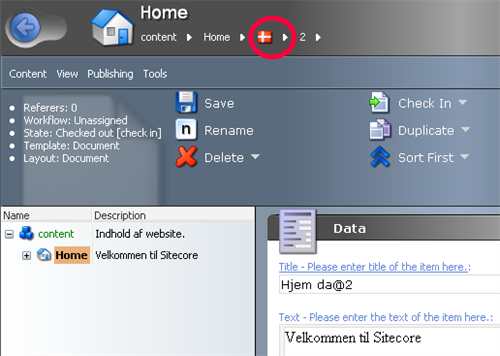
Changing client default content language
Despite the simplicity of this solution, nevertheless I 've decided to publish it.
It is possible to accomplish this by modifying your web.config file.
You should add the contentLanguage attribute to the shell site in the
contentLanguage="da"
Now your default content language should be changed to Danish.
Disabling workflows
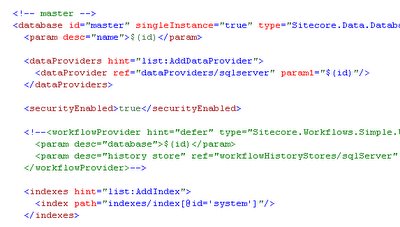
There at least two ways to disable workflows:
1. Remove (or disable) workflowprovider in web.config for the master database:
 2. Set enableWorkflow="true" for the site in web.config:
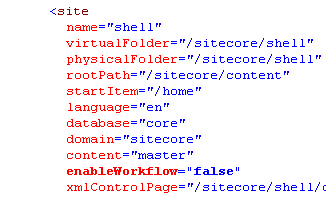
 2. Set enableWorkflow="true" for the site in web.config:

Subscribe to:
Posts (Atom)